![TermSheet Logo-1.png]](https://help.termsheet.com/hs-fs/hubfs/TermSheet%20Logo-1.png?height=40&name=TermSheet%20Logo-1.png)
The TermSheet Add-in for Microsoft Outlook allows you to log emails, create deals and contacts, sync contacts, and add attachments to corresponding deals in TermSheet without leaving your inbox.
⚙️ Steps
Install TermSheet Add-in
-
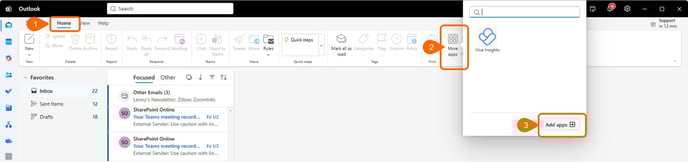
In Outlook, click Home > More Apps on the ribbon.
-
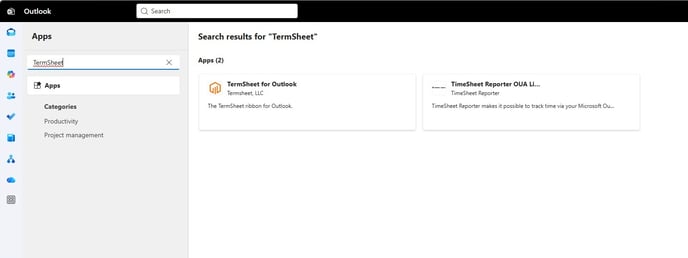
On the Add-Ins for Outlook page, browse for the TermSheet add-in by selecting All and scrolling through the list, or search for it by using the Search box.
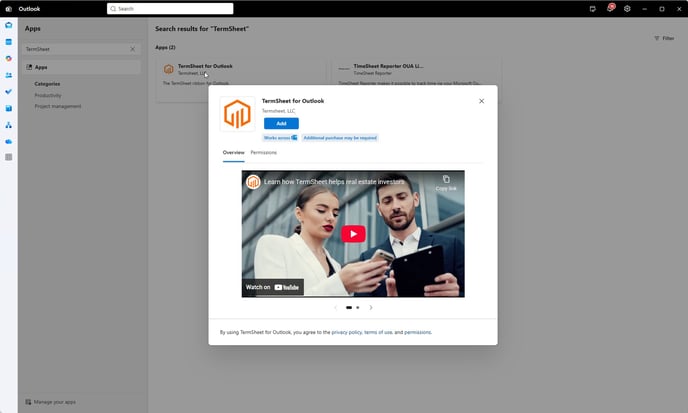
Click Add. The TermSheet add-in is free from the Office Store.
-
When the add-in is installed, go to File > Manage Add-ins or Manage Apps to make sure it's turned on. When you’re prompted to sign in, type the email address and password you use to sign in to Office programs.
If you don’t see the Manage add-ins (or Manage Apps) button, you won’t be able to get add-ins for Outlook. To get them, you’ll need Office 2013 or Office 2016 and Exchange 2013 or Exchange 2016, and your administrator needs to activate add-ins for Outlook.
Once installed, the TermSheet add-in will automatically appear in the Messages ribbon.
Click the “TermSheet” icon on the top bar to open the add-in.
You can then click the Pin icon on top of the add-in to keep it open.

If the add in does not appear, you may need to turn on the add in in settings.