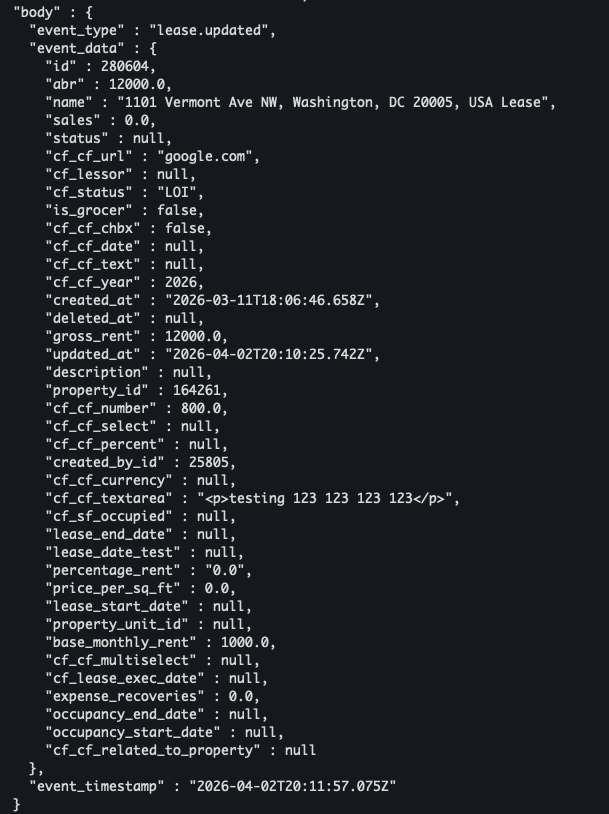
Learn To:
⚙️Steps
Configure API Keys
API Keys can be configured in Settings and used with the API endpoints found here:
https://app.termsheet.com/api-docs/index.html
- Select the gear icon to access admin Settings. Note that you'll need admin-level permissions to manage API keys.
- Select API Keys from the left sidebar menu. Users must have admin permissions or specific permissions to access this option.
- Select Create API Key. Give the API Key a name to help identify it in the list view. Select Save. An API Key will be generated.
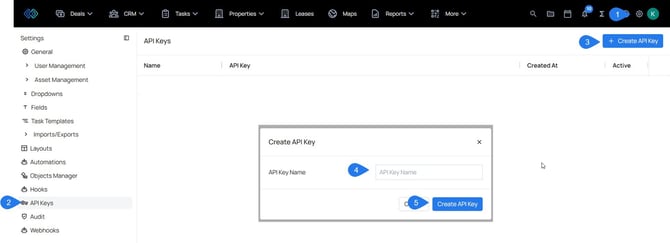
- Copy and store the key. The API Key can be viewed in settings but will be hidden by default.
Configure Webhooks
Webhooks allow external applications to receive automated notifications whenever specific events occur in Termsheet. When a subscribed event is triggered, Termsheet sends an HTTP POST request to an endpoint URL you provide, containing details about what changed. This is useful for syncing Termsheet data with third-party systems, triggering automations, or building custom integrations without polling the API.
Webhooks are configured from the Termsheet Settings panel. You'll need admin access to create or manage webhook subscriptions.
- Navigate to Settings and select Webhooks.
- Click + Create Webhook.
- Complete the form's required fields
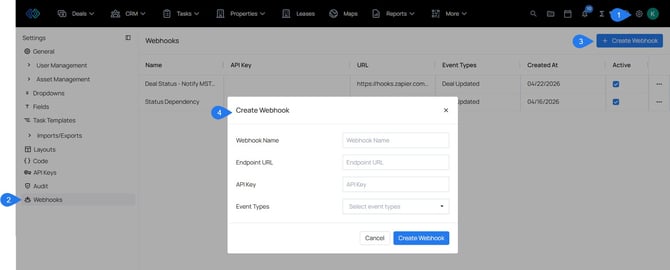
- Webhook Name: Enter a descriptive label to help identify this webhook subscription among others in your workspace. This name is only visible in Termsheet and is not sent with webhook payloads.
- Endpoint URL: The full URL of your application where Termsheet will send event notifications — for example,
https://yourapp.com/webhooks/termsheet. This must be unique across all webhook entries in your workspace. - API Key (optional): An optional key you define and implement in your application to verify that incoming requests are genuinely from Termsheet. Include it in your app's request validation logic.
- Event Types: Select one or more events you want to subscribe to. Termsheet will only send notifications for the events you choose — all other events will be ignored. For example, selecting Deal Created and Deal Updated, means your endpoint receives payloads only for those three actions.
Technical Integration
For each event we will send a HTTP request to the Endpoint URL you provided in the Webhooks configuration.
This HTTP Request will always use the method POST:
The request headers
{
  "Content-Type": "application/json",
  "X-Webhook-Api-Key": your_api_key_here
}
The "X-Webhook-Api-Key" will contain the API Key you provided when creating the Webhook via UI.
The JSON body structure
{
  "event_type": "lease.created",
  "event_data": { serialized_object },
  "event_timestamp": "yyyy-mm-dd hh:ii:ss"
}
Event Type
The event_type attribute will always be a lower case string with the object name combined with the action.
List of event types
| Event Type | event_type |
| Company Created | company.created |
| Company Deleted | company.deleted |
| Company Updated | company.updated |
| Contact Created | contact.created |
| Contact Deleted | contact.deleted |
| Contact Updated | contact.updated |
| Deal Created | deal.created |
| Deal Deleted | deal.deleted |
| Deal Updated | deal.updated |
| Lease Created | lease.created |
| Lease Deleted | lease.deleted |
| Lease Updated | lease.updated |
| Property Created | property.created |
| Property Deleted | property.deleted |
| Property Updated | property.updated |
| Unit Created | unit.created |
| Unit Deleted | unit.deleted |
| Unit Updated | unit.updated |
Event Data
The event_data holds the represation of the subject of the action that generated the webhook.
Deleted action
The data for the deleted action will be just the object id
{
  "id": object_id
}
Created and Updated actions
The data for created and updated action will be the serialized object as JSON with the standard attributes and custom fields